Nova
RFX’s interface had accumulated Material Design, Bootstrap, and custom CSS, leaving similar tasks with different patterns across the product. I created Nova to bring those experiences into a shared Angular and Tailwind system, carrying interface decisions into reusable components, forms, and dark mode. Raygun is its React successor.
Explore Raygun’s React documentation →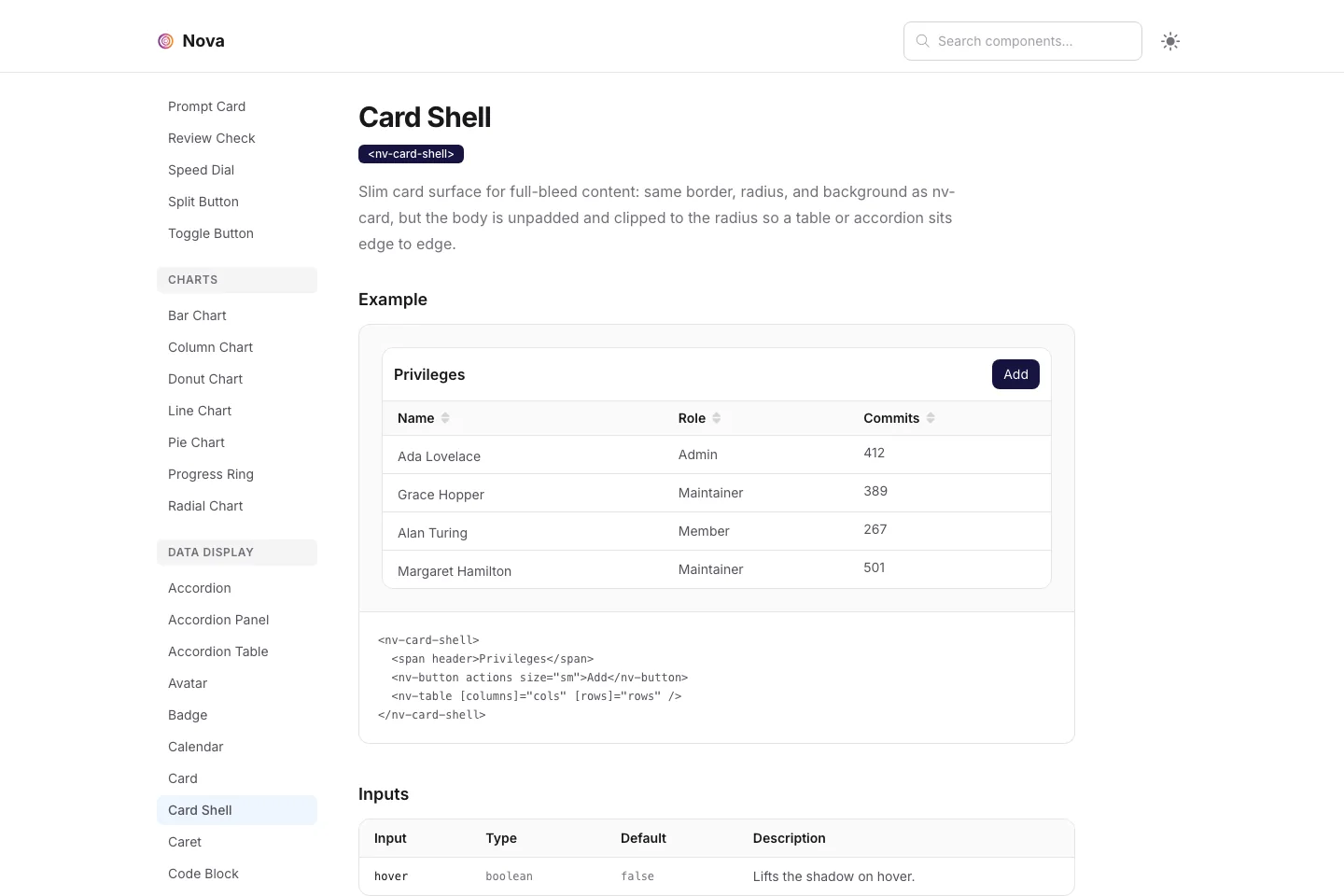
One product. Too many UI dialects.
RFX had accumulated Material Design, Bootstrap, and custom CSS across its interface. Similar tasks could look and behave differently depending on where someone encountered them. I created Nova to give those experiences a common foundation, defining reusable interface patterns and implementing them as Angular components.
Decisions made screen by screen.
Overlapping libraries and one-off styles left the same interface problems to be solved repeatedly: how to label a field, show an error, organize a table, or support another theme.
Patterns the product can share.
Reusable components bring appearance, interaction, and implementation together. A shared foundation gives new work a consistent starting point and existing screens a path toward alignment.
Consistency starts below the screen.
A common set of building blocks.
Zinc surfaces, compact typography, rounded controls, and consistent spacing establish a recognizable interface across forms, tables, and navigation.
States belong to the component.
Focus, validation, disabled states, and dark mode are part of the component’s job. They travel with the pattern as it appears in different workflows.
Built for its environment.
Standalone Angular components, signal-based APIs, and forms integration connect the design language to the way the product is built.
See the decisions. Try the details.
These are focused React recreations of Nova’s Angular component patterns, built for this portfolio. They demonstrate the visual language and selected interactions with sample data; the linked documentation contains the original Angular components.
A field is more than an input.
A consistent label, required marker, control, and helper message make the form predictable. Validation replaces the helper text in the same place, with focus returning to the first field that needs attention.
Try it: save an empty form, enter an invalid email, then correct it. Use Tab to follow the focus states.
View Angular Form Field documentation ↗Structure without extra layers.
The Card Shell gives a table one boundary, a clear header, and room for actions. Its unpadded body lets rows meet the edges without nesting another card inside it.
Try it: sort by commits, select a few members, or search for an unmatched name to reveal the empty state.
View Angular Card Shell documentation ↗| Ada Lovelace | Admin | 412 | |
|---|---|---|---|
| Alan Turing | Member | 267 | |
| Grace Hopper | Maintainer | 389 | |
| Margaret Hamilton | Maintainer | 501 |
Same task. A different light.
Theme changes reach every layer: the surface, border, text, control, and action. The layout and interaction stay familiar, and changing the palette preserves the work already in progress.
Try it: switch to dark mode, change the frequency, then switch back. Pause summaries to see the disabled control.
Explore the Angular library ↗The quieter states do important work.
- Keyboard focus
- A visible focus ring identifies the active control. Native inputs and buttons keep the examples operable with a keyboard.
- Validation
- Errors appear beside the field, are linked to it programmatically, and describe a correction. Required fields remain identifiable beyond color alone.
- Sorting & selection
- Column headers expose their sort direction. Each checkbox names its row, and the header checkbox reflects partial selection.
- Empty & disabled
- An empty search explains what happened and offers a way back. Disabled fields keep their labels and supporting context visible.
A system people can put to work.
The documentation pairs rendered examples with implementation snippets and API references. Designers can inspect the intended behavior, while developers can see the inputs, slots, and forms conventions behind it.
Example → implementation → API
The Card Shell page shows the rendered table, the Angular markup that composes it, and the header and action slots. The design decision and its implementation stay close together.
A foundation that can grow with the product.
I carried Nova from interface patterns into reusable Angular implementation, then developed Raygun as its React successor. The work goes beyond choosing how a component looks: it defines how that component responds, how it communicates its state, and how someone else can use it consistently.