Provider Wallet
Provider Wallet is a pre-launch credentialing app for busy healthcare providers who will use it occasionally rather than every day. I designed it to make return visits familiar and the next action clear, then built a working React prototype with Codex in under two weeks. A native port was ready for App Store deployment in under 30 days.
STATUS · PRE-LAUNCH
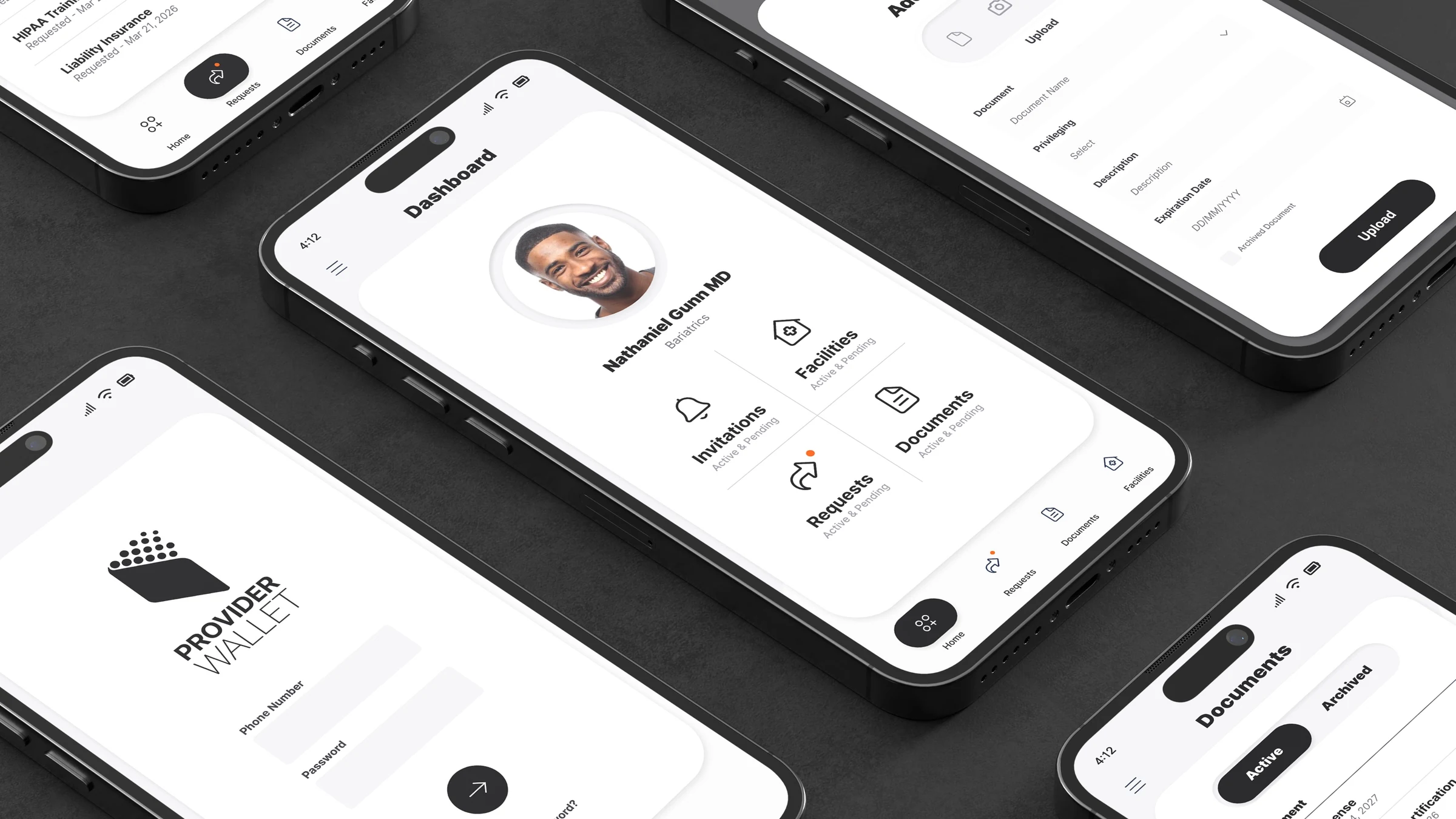
Easy to return to. Quick to act.
I designed Provider Wallet for busy healthcare providers who will not use it daily. When they return, they should remember where to go and understand what needs their attention. The app will connect to the wider RFX platform, with the goal of making onboarding easier at facilities already using it.
An occasional task should not require relearning the product. I needed to keep invitations, requests, documents, and facilities easy to find, with clear actions in each context.
I prioritized ease of use and speed: familiar destinations, explicit action labels, and enough space to distinguish the task from its supporting details.

A healthcare provider managing professional access and credentials.
Busy providers handling facility invitations and credential requests between other responsibilities. The design should support short visits and remain understandable after time away.
Product goals
G.01
Orient quickly
Use a dashboard and persistent bottom navigation to surface the main work areas.
G.02
Resolve work
Keep request status, facility context, and document actions close to each item.
G.03
Maintain records
Support adding, editing, archiving, and deleting provider documents.
Information architecture
Dashboard

Invitations
Pending facility decisions
Requests
Active / Completed by facility
Documents
Active / Archived credentials
Facilities
Active / Pending relationships
Six paths through the product.
I kept invitations, requests, and document maintenance connected to the dashboard so providers have a familiar way back after completing a task. Solid arrows show the main task paths; dashed connectors show returns and shared navigation.
GRID 5 × 6 · INTERFACE EVIDENCE ONLY
ENTRY
Authentication and first orientation
DASHBOARD
Choose the work domain
REQUESTS
Review requested credentials by facility
DOCUMENTS
Maintain reusable credential records
FACILITIES
Resolve and view facility relationships
MENU
Secondary account and support paths


01 · ENTRY
02 · ORIENT
03 · REVIEW
04 · DECIDE / ACT
05 · RESOLVE
Splash
SCREEN
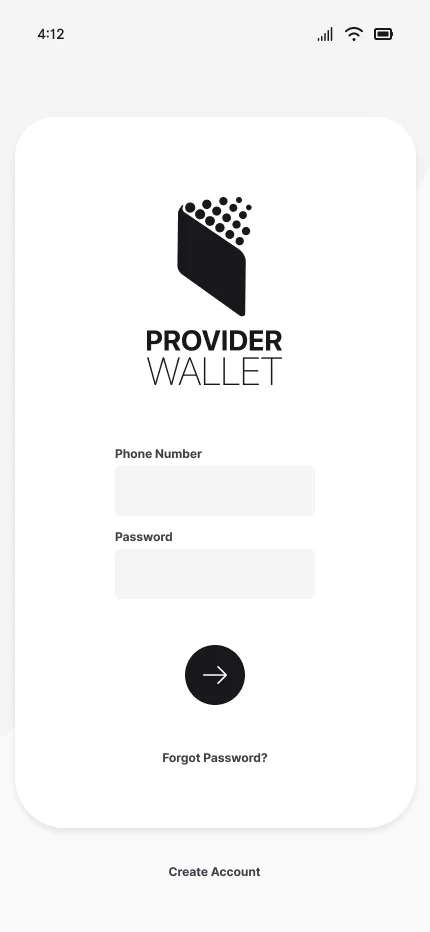
Login
Credentials entered
Phone Number · Password

valid?
Dashboard
Authenticated entry
Dashboard
Profile + 4 destinations
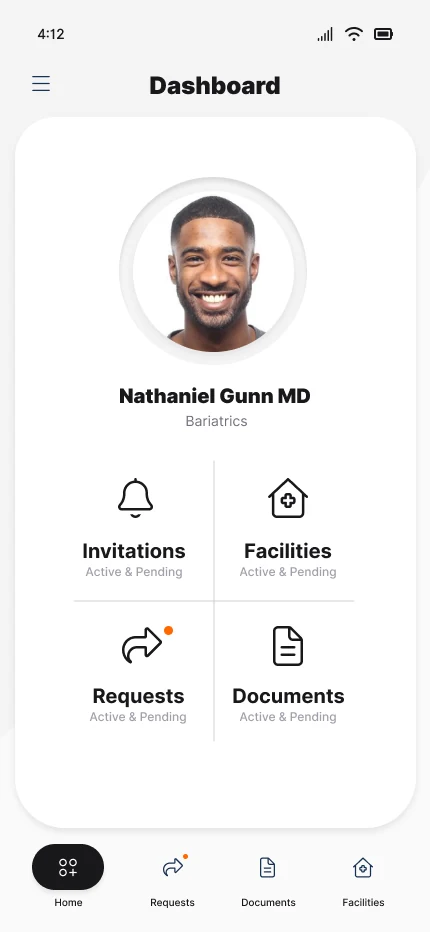
Home hub
SCREEN
which task?
Requests · Documents
Bottom navigation + dashboard tiles
Facilities · Menu
Destination retains shared chrome
Requests entry
Home tile or bottom tab
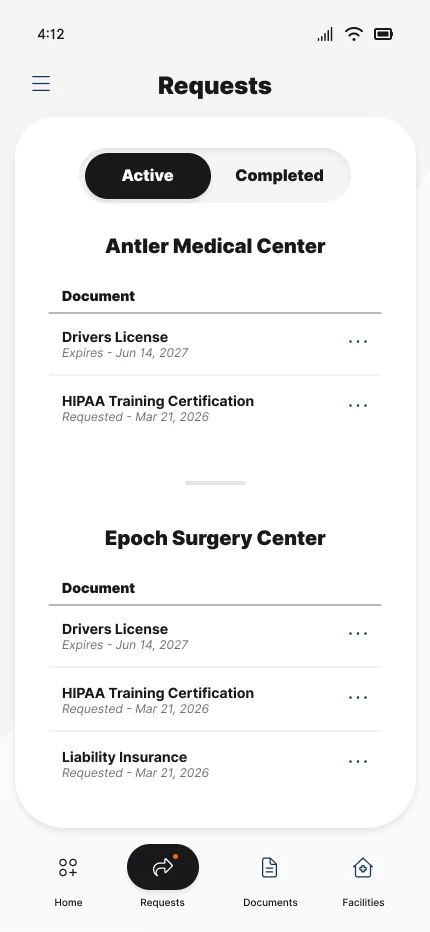
Facility-grouped list
SCREEN
Active / Completed
Segmented status model
item menu
Review credential
Drivers License · HIPAA · Liability
Documents entry
Home tile or bottom tab
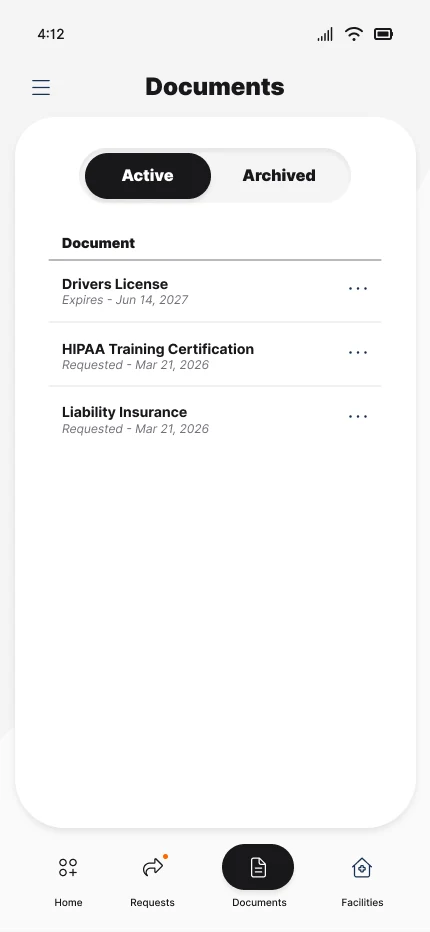
Active documents
SCREEN
Add Document
File · Camera · Upload source
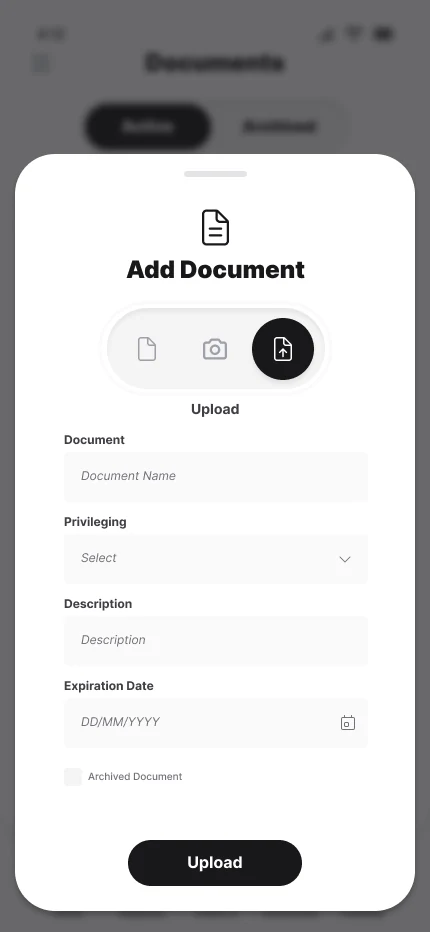
Document form
SCREEN
Upload / Save
Or Edit · Archive · Delete from item actions
Invitation
Dashboard destination
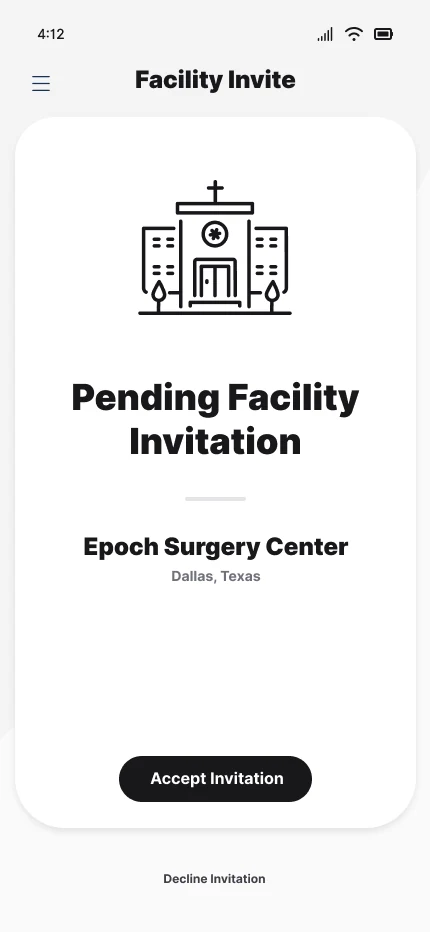
Pending facility invite
SCREEN
accept?
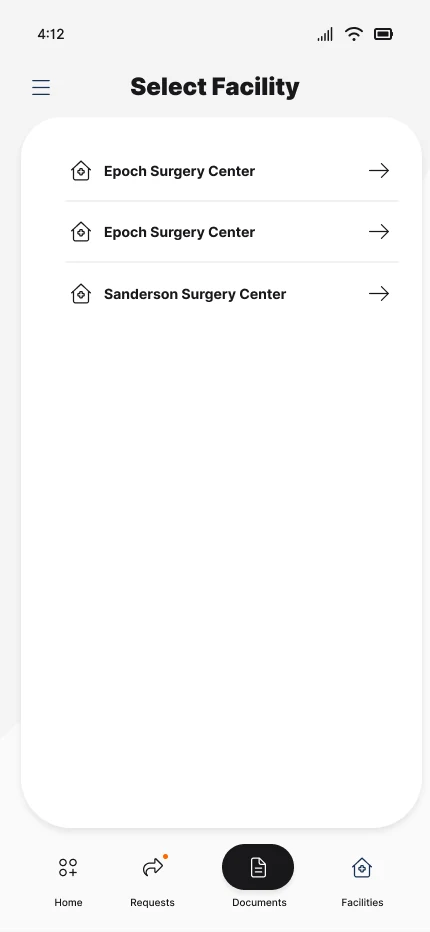
Select Facility
SCREEN
Facilities
Active / Pending · empty state available
Menu trigger
Hamburger from primary screens
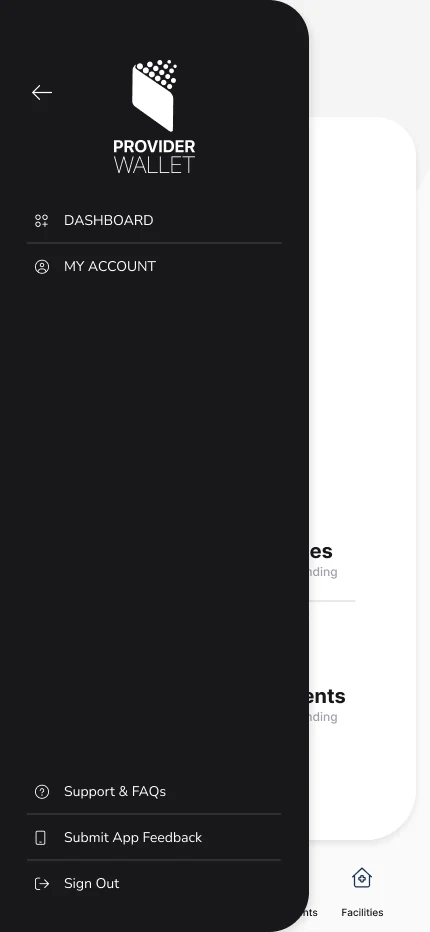
Navigation drawer
SCREEN
Primary links
Dashboard · My Account
Support links
FAQs · Feedback
Session exit
Sign Out
Read the workflow steps
ENTRY
Splash → Login → Credentials entered: Phone Number · Password → valid? → Dashboard: Authenticated entry
DASHBOARD
Dashboard: Profile + 4 destinations → Home hub → which task? → Requests · Documents: Bottom navigation + dashboard tiles → Facilities · Menu: Destination retains shared chrome
REQUESTS
Requests entry: Home tile or bottom tab → Facility-grouped list → Active / Completed: Segmented status model → item menu → Review credential: Drivers License · HIPAA · Liability
DOCUMENTS
Documents entry: Home tile or bottom tab → Active documents → Add Document: File · Camera · Upload source → Document form → Upload / Save: Or Edit · Archive · Delete from item actions
FACILITIES
Invitation: Dashboard destination → Pending facility invite → accept? → Select Facility → Facilities: Active / Pending · empty state available
MENU
Menu trigger: Hamburger from primary screens → Navigation drawer → Primary links: Dashboard · My Account → Support links: FAQs · Feedback → Session exit: Sign Out
Tasks remain explicit from entry to resolution.
These three workflows show how I brought the main tasks into the prototype: accepting a facility invitation, responding to a credential request, and maintaining a document. The focus is on making the required action clear during a short visit.
Resolve a facility invitation
The invitation screen isolates one decision, identifies the facility and location, and gives acceptance visual priority while keeping decline available outside the card.

- 01
Enter Invitations
The dashboard exposes Invitations as one of four equal operational destinations.
- 02
Confirm context
“Pending Facility Invitation,” “Epoch Surgery Center,” and “Dallas, Texas” are grouped before action.
- 03
Accept or decline
Accept Invitation is the primary action; Decline Invitation remains a distinct secondary path.
Review credential requests by facility
Requests preserve facility ownership and document status. Active / Completed provides a compact lifecycle filter without changing the list structure.
- 01
Choose Requests
Entry is available from both the dashboard grid and persistent bottom navigation.
- 02
Scan by facility
Antler Medical Center and Epoch Surgery Center structure the credential groups.
- 03
Open item actions
Each document row exposes a consistent ellipsis action target beside status metadata.
Add and maintain a document
The document flow separates record state from record creation: Active / Archived organizes the library; a modal form collects source, type, description, and expiration date.
- 01
Choose Add Document
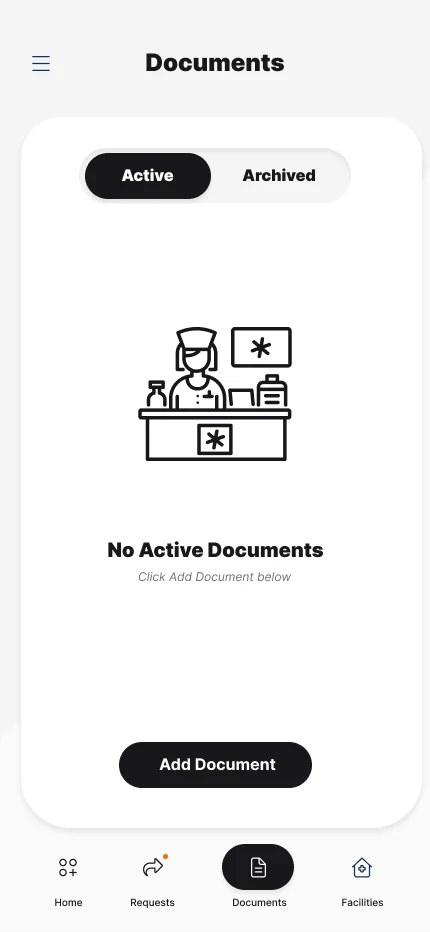
A persistent primary button remains anchored near the bottom of the document card.
- 02
Select a source
File, camera, and upload choices appear as one compact source control.
- 03
Maintain the record
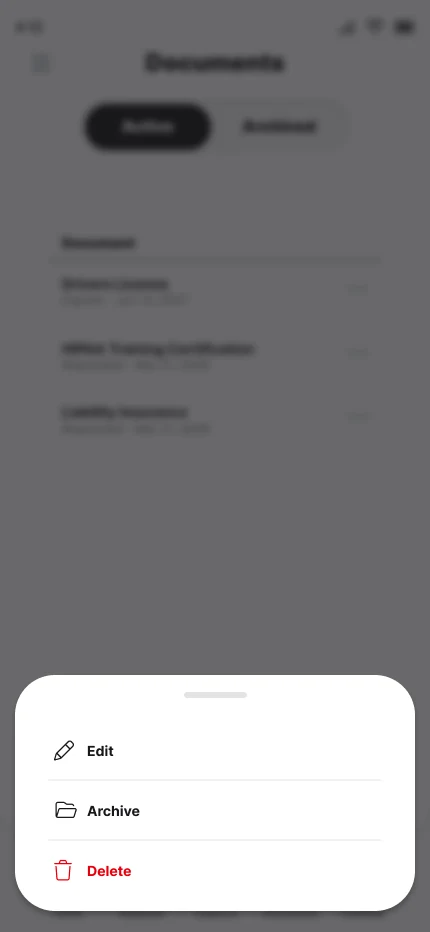
Item actions expose Edit, Archive, and Delete; edit reuses the document form fields.
Three priorities shaped the interface.
I focused on making the product easy to remember, fast to use, and visually considered. These are design intentions for a pre-launch product; they have not yet been validated through adoption or provider feedback.
1. Make return visits familiar.
Because providers will not use the app every day, I kept the main destinations consistent and used straightforward labels. The dashboard and navigation give Invitations, Facilities, Requests, and Documents a stable place to return to.
2. Make the next action clear.
I kept facility context, request status, and relevant actions close together. Accept, decline, upload, and edit are explicit choices, so busy providers can identify what needs doing without searching through the interface.
3. Convey quality through restraint.
I chose a clean, minimal aesthetic with strongly contrasting white and dark surfaces, generous padding, and animation. The intention is to make the experience feel considered while keeping attention on the task.

A familiar starting point
RETURN VISITSD.01
Keep the main tasks in a stable place
I gave Invitations, Facilities, Requests, and Documents consistent destinations. For providers returning after time away, recognizable labels and a familiar starting point matter more than learning a new navigation pattern.
Context before action
QUICK TASKSD.02
Keep the requirement and its facility together
I grouped requests by facility and kept status, dates, and document actions close to the credential. The intention is to help a busy provider identify what is needed and where it applies during a short visit.
Focus on the task at hand
MINIMAL INTERFACED.03
Give the action room to stand out
I used contrasting light and dark surfaces and generous padding to separate the upload task from the surrounding interface. The clean presentation and animation are intended to convey quality while keeping the required action clear.
Absence, overlays, and repeated controls stay inside the same shell.
Empty states explain what is missing and, where action is possible, what to do next. Overlays preserve screen context while narrowing attention.
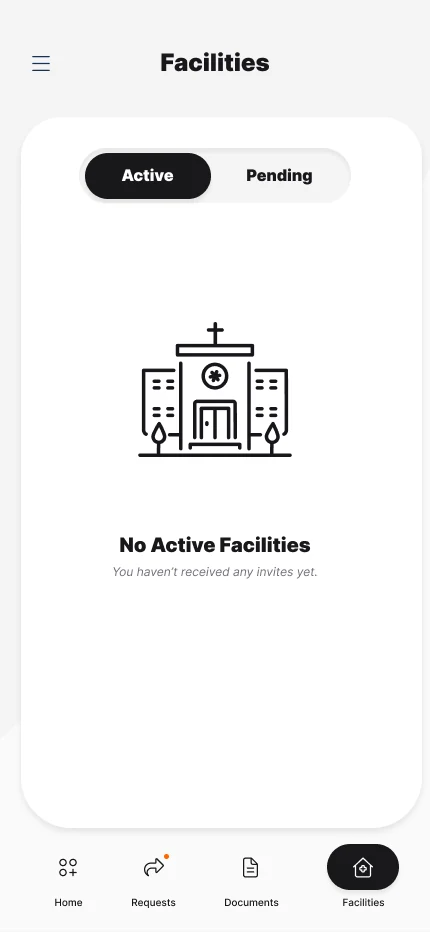

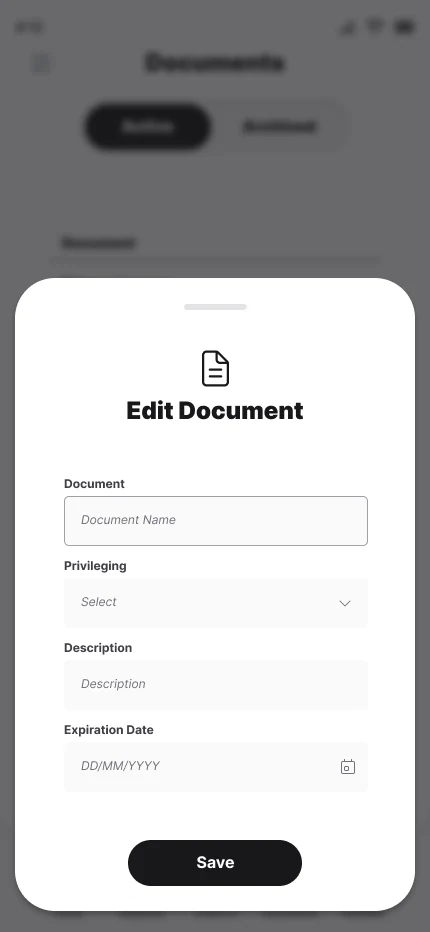
Bottom sheets and dialogs use a dimmed, blurred origin screen. The action menu separates destructive Delete in red; Edit reuses the document form vocabulary and ends with Save.
- App shell
- Persistent orientation
- STATUS · TITLE · CARD · BOTTOM NAV
- Segmented control
- Lifecycle switching
- ACTIVE / COMPLETED · ARCHIVED · PENDING
- Document row
- Credential scan + action
- NAME · DATE STATUS · ELLIPSIS
- Primary pill
- Single focused action
- ACCEPT · ADD · UPLOAD · SAVE
- Context overlay
- Edit or item action
- SCRIM · HANDLE · SHEET / DIALOG
From design to a working prototype.
Provider Wallet has not launched yet. I designed the mobile experience, built a working React prototype, and prepared it for native release.
I brought the design into a working prototype so the team could inspect the flows and interactions before release.
O.01
A working prototype
I designed the experience in Figma and built a working React prototype with Codex in under two weeks.
O.02
Prepared for native release
A native port was ready for App Store deployment in under 30 days. The product has not launched; adoption and onboarding results are not yet available.
Try the working experience.
Explore the complete mobile flow—from sign in and facility invitations to document management and completed requests.